Showing posts with label art. Show all posts

Wednesday, 9 November 2022

Triune brain, more anatomy!


Much pleased with how this has turned out. Almost a commission, really a suggestion by a teacher friend who has to explain these things to children. Of course it's me in the middle, possibly it's not quite cartoony enough, but it's a process I want to continue exploring. It relates to my Proposal and it engages drawing/illustration and graphic design. I await a formal critique with interest. When I have a collection of these I shall put them up for purchase for a small amount. (like you, I have to eat!)
Be interesting to see some feedback below.

Wednesday, 9 September 2020

Progress on the tree painting...

Progress on the tree painting. I have the main shapes in. After a false start and several experiments, I finally started using #liquin fine detail to get the consistency I wanted from oil paints. Not perfect, but that may be some very old tubes of paint that are very stiff anyway. Second photo shows detailing. 

Will be unified with a glaze like final snapshot.

Whole image, it's 100cm x 100cm on canvas. Have painted about 25% of detail. Really taking ages, about a week now. Manage around 3 hours a day. But not every day. Arm aches after that!


Close up of detailing. First layer, will need light/dark/underpaint in-between lines. Then glase with overall wash.


Test glaze. Needs bit more work. Struck me I could use a gold underneath or even gold leaf in a future project.


Wednesday, 19 August 2020

Bathscape Walking Map. Part Two

 Armed with the information from the walk and (obviously) a brief from the client, I sat down yesterday to start drawing the map. This is just first draft, I have a feeling there will be many drafts. Already I can see changes I want to make. For what it's worth, I think the rear works better than the front - but that may be the effect of the pencil drawing here - makes it look very busy.

That green lettering has to go!

Red tint is result of poor scan.


Thursday, 14 May 2020

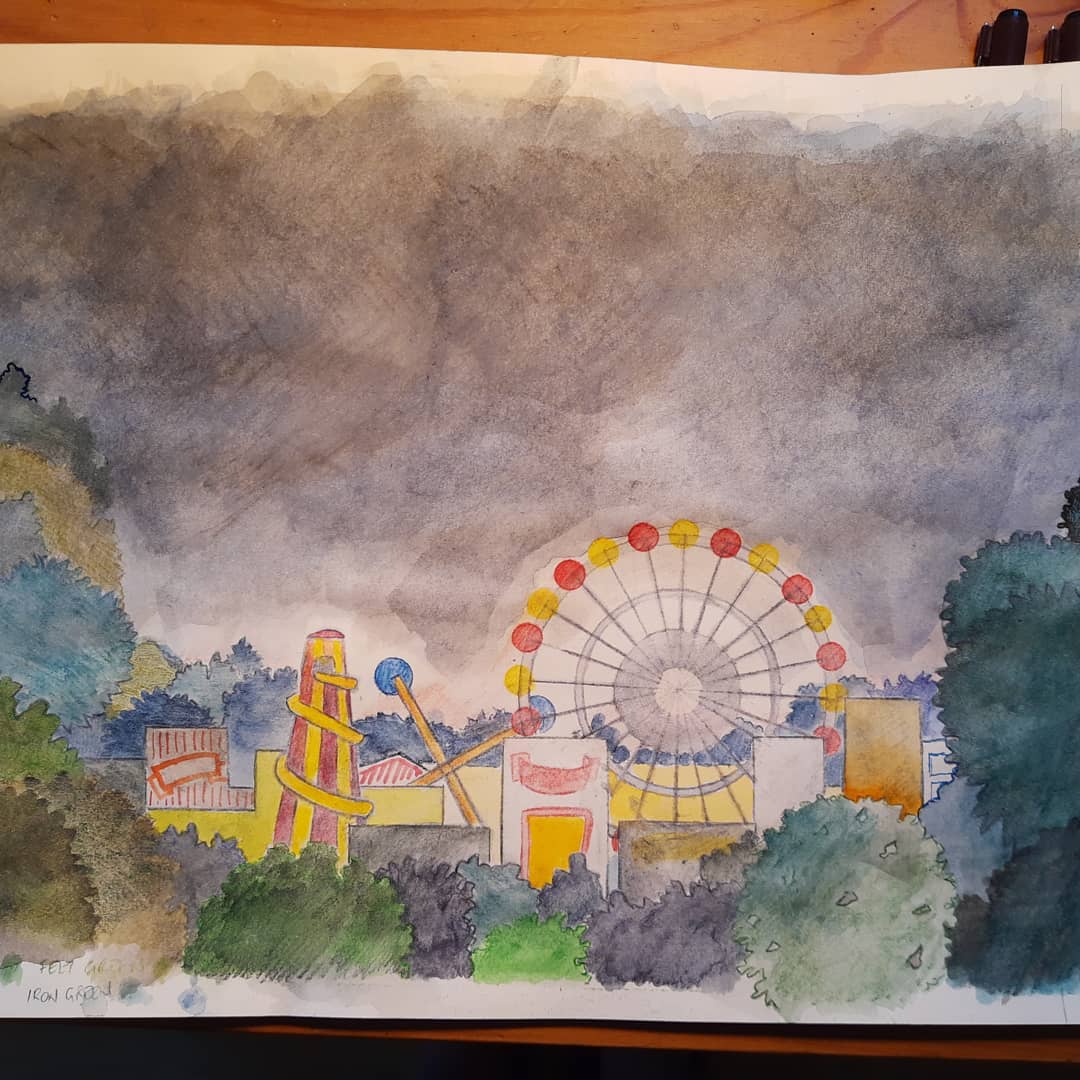
Fairground, working on drawing.

Got some colour in it now. Working on and layering colour. Going to scan it now, have decided to ink it i and use pencils. fence to ba added, but that is a operate file and will be added in photoshop Contrast not high enough when small. Which it will be.


One of three things on the go at the same time. Progressed from yesterday.Do a bit, paper now very wet, wait to dry, erase unwanted marks, do another bit. Derwent inktense watercolour pencils. Lots of layering. 


Here's the pencils

The rough for the client. Literally back of an envelope...


Sunday, 26 April 2020

Dissecting the Furby, part two...


stephen.d.spicer You may recall an earlier posting where I pulled a #Furby apart. This is one idea that sprang from that. What if it turned out they were actually flash and blood? This is a nearly finished bit of artwork. Was going to put it and actual bits in a museum-style case - but changing mind. Maybe it needs the videos posted earlier for effect - check the instagram link.

There's two versions of the text on these images. Still trying to work out best. Also images taken two ways. One at the top is a scan that's been joined up, the lower one here  is a photograph.


#bathspa #bath_bafineart #automata #furby #sculpture #art #bathspauniversity#woodandharrison #robot #toy #electronics #assemblageart #assemblage #biology #guts#art #bath_bafineart

Monday, 20 April 2020

Madonna, sketchbook work.

So this is a trial. Vaguely based on my memories of Leonardo's Virgin on the Rocks it is an experiment with grey-scale underpainting, followed by a set of coloured washes. Came out better than I expected. Drawing below is unfinished, as I went on, inspired by this to draw the other Madonna here - which got a huge amount of interest from the people who say it. That image started the same way but was finished with glitter gel pens.

Saturday, 18 April 2020

More Sky.


Close up rough of 'Sky' that I put up a couple of days ago. Clouds part to see sun, birds fly past all warm and glowing. Sun goes down, moon comes up. Rocket fly's past. Clouds cover up again.
In a dark room with cloud/sky projections. Box in middle is a Peepshow/diorama that is filled with clouds and mysterious flying objects. Some of these escape... #sculpture #diorama #art#bathspauniversity #bath_bafineart#automatamagazine #automata #skyline#cloudscape #peepshow #arcade #vintage#penandink #pencil #teastain #inktensepencils#derwentinktense #derwentartists#colouredpencils #sun #moon


Wednesday, 15 April 2020

Sky automata/sculpture about flying and peace.


This called 'Sky' at the moment. Dark room with cloud/sky projections. Box in middle is a Peepshow/diorama that is filled with clouds and mysterious flying objects. Some of these escape...

One of the things I can't build at the moment, So another "Speculative Automata" for the Museum.

Thursday, 2 April 2020

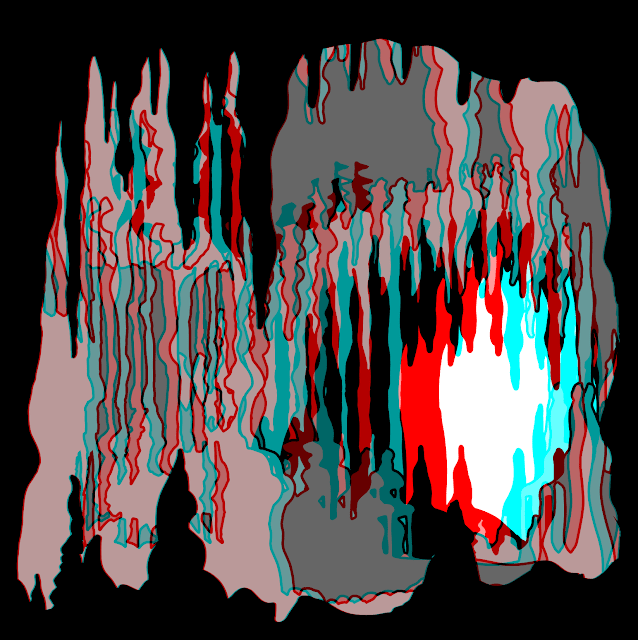
Another 3D pic. With instructions...

I think this version is the best. In the end I did about twenty different versions. There's another one at the end of this. Instructions follow...
So this is about creating the images you see here. The origin of tis one is a practical model I made for another student's show. The box is about 45mm wide, so if you're looking at this on a phone, it's about life size.

Here's how it was done:

Software: Adobe Illustrator, Photoshop. I assume you have some knowledge of these applications.
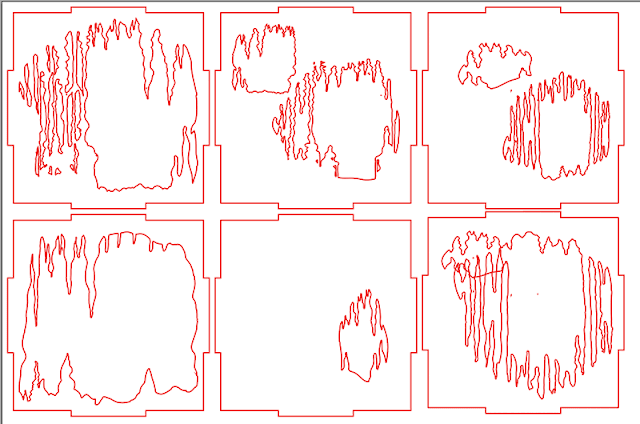
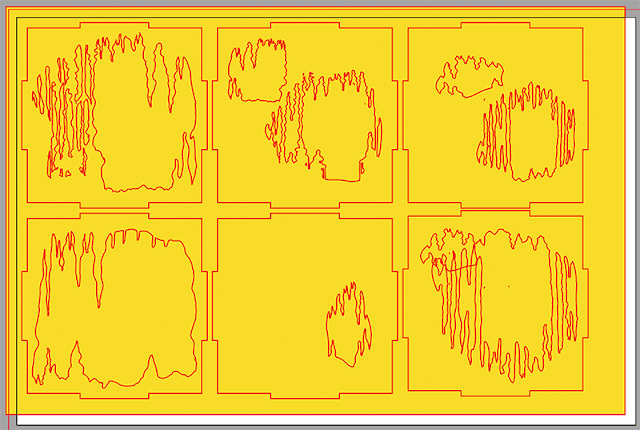
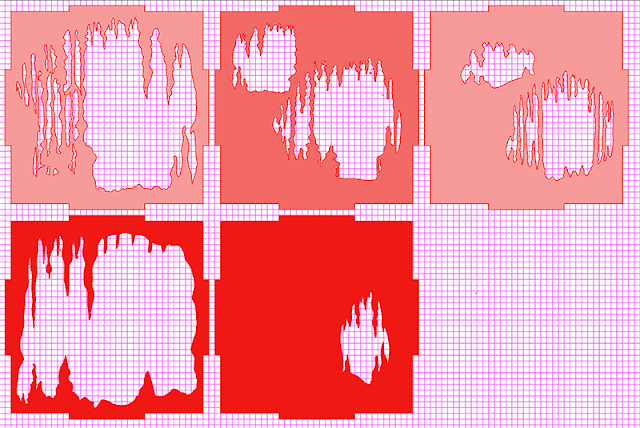
So, this is the Illustrator file that I got ready for the Lasercutter. There's a bit more, there are just the faces and I didn't use the one bottom right in the end. The missing parts are the sides and the top and bottom.

So, the Laser cutter needs just outlines, no fills. It also doesn't like Illustrator's compound paths or other Postscript trickery, so to prep the file for the Lser cutter I get rid of all of those. Unfortunately, for the 3D image we do need 'real' holes in the illustration, so these have to be put in. What you are looking at here is a yellow layer put behind everything so I can see that these are holes and not just filled with white.
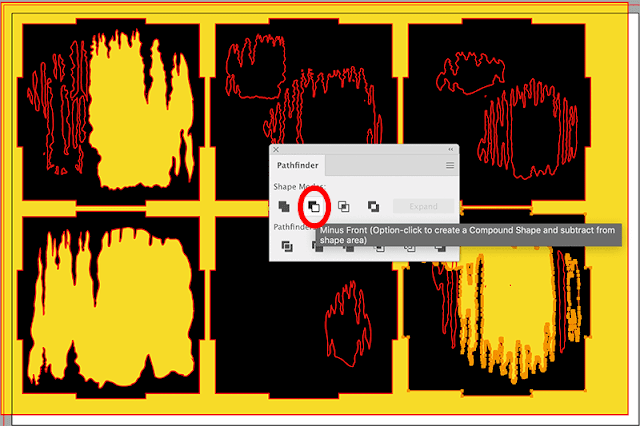
So, the box shapes have been filled with black. (See bottom middle) the whole group have been stroked (outlined) in red so I can see them. I'm then selecting each element in turn and using the Pathfinder to take the small shape from the big shape. This cuts holes in the shapes. An alternative that sometimes works is making the whole thing a Live paint object and filling with nothing. 
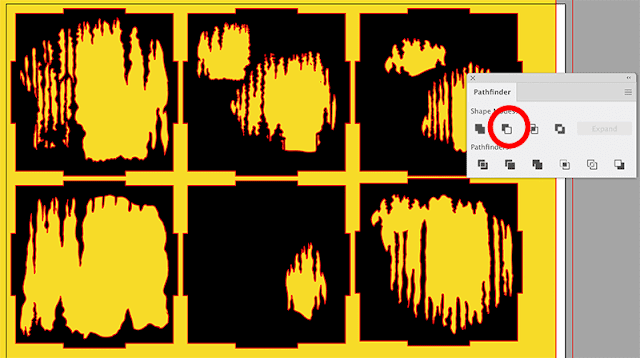
Here we are almost all done...
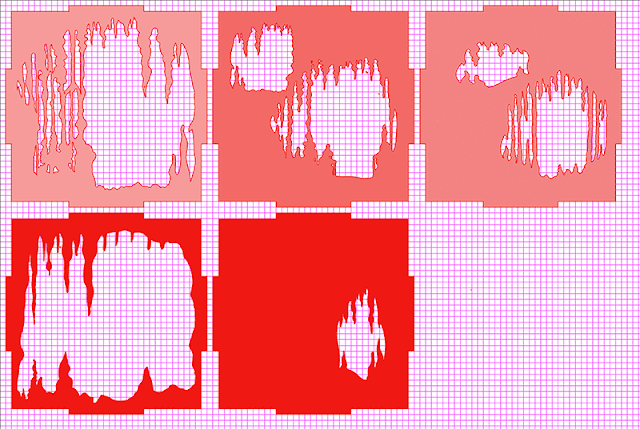
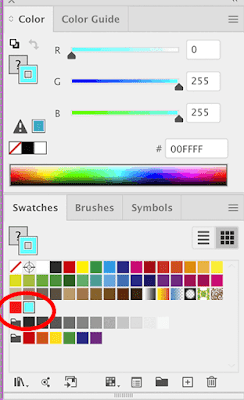
Now the fun begins. I have coloured these 100% RGB Red (255, 0, 0). Then switched to HSB, which allows me desaturate the colour without changing it. You can of course do this other ways. I'm using peak red as this is a colour that disappears nicely on cheap anaglyph glasses. Note; Illustrator works in CMYK by default. Switch the document to RGB!
So, make a copy on another layer and repeat the process. This time we are using Cyan as it is the complimentary to Red. Personally, I think Green works better, but you have to have Red/Green anaglyph glasses and they are harder to find. Cyan has issues- which I might do another blog post on at some time. (Grief this is taking me back to my first trip to art school where I first did experiments in stereoscopy..)  Here's me stroking the paths.
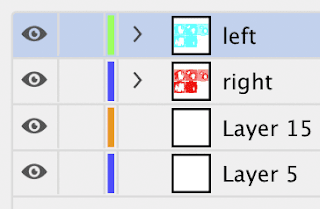
Here's a peek at the Illustrator layers. Doesn't matter much which way around they are.

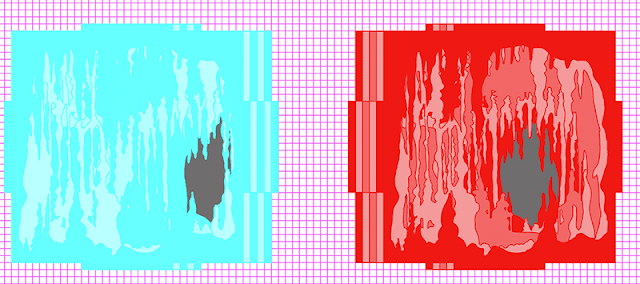
When you have done this, stack one channel on top of each other, despite this being the red, I stacked the blue because they are harder to see.
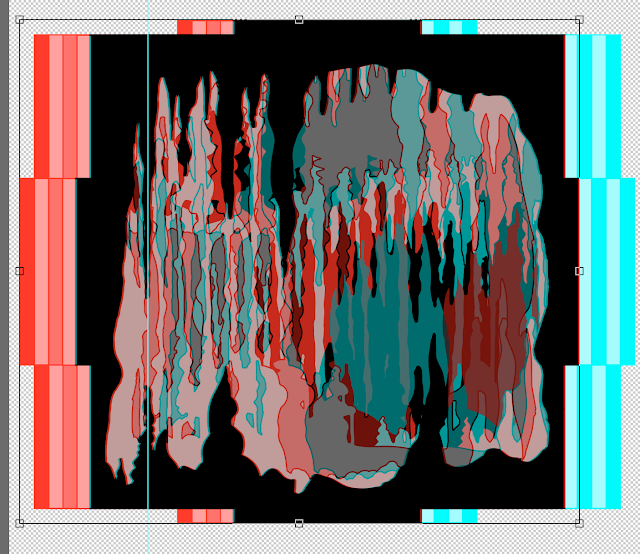
Here they are stacked. And HERE IS THE TRICK that will make them three dimensional. The stacks are slightly offset as you can see in this picture. here I've exaggerated the offset. In the working one it was much smaller and I experimented with different settings. I also swapped colours around, altered densities and so on. Probably about twenty experiments in all. But it's the offset that creates the illusion. You should also not that what works nicely at phone size may not work well at desktop or projection.
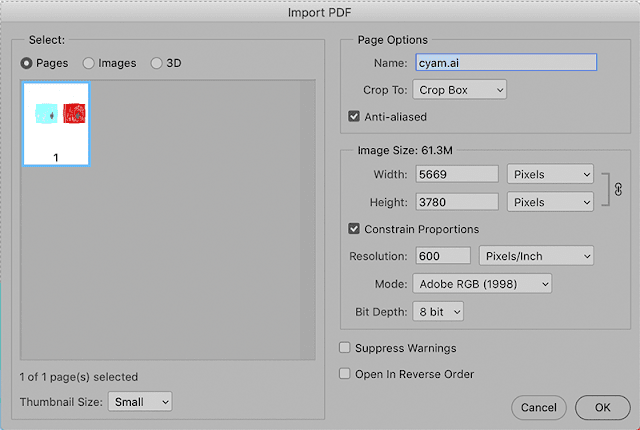
Once this has been done, open the Illustrator file in Photoshop. I use quite a high resolution, it's easy to downsize if you need to. You can see that Photoshop automatically flattens the file. 

In Photoshop, copy one colour to a layered then align. You will need to experiment with this. Basically where the two layers align completely becomes the screen level. Other layers will appear on top or below this. What I do is just sit and tinker until it looks right.
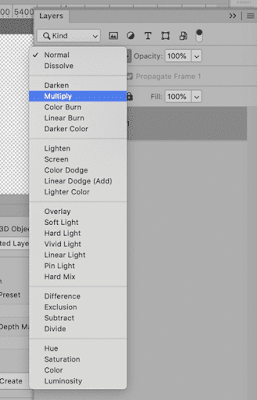
Very important!! Set the top layer to the Multiply setting in the blend menu in Layers. This simulates overprinting and the effect of transparent ink. Without this, you won't get the effect. Incidentally, you wouldn't do this is you wanted to print the image. This is for screen use.
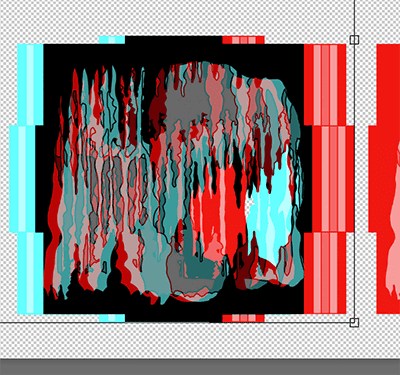
Here's more-or-less the final version in Photoshop, at least, the technically final version, it's working now. You'll notice that I've swapped the cyan and red around so that it works with the glasses I have; although I could have simply worn the glasses around the other way.
And that's it, just about. Start simple, amuse yourself. Then you can go for more complex stuff.
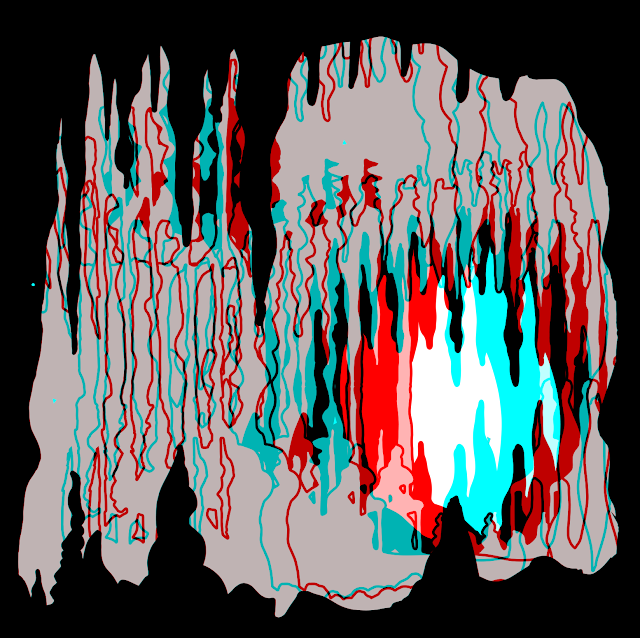

this is the other version. I think the shaded version works bette, although there's an issue with the blue/cyan colour as the shading is very difficult to see.

Wednesday, 1 April 2020

Forest automata in 3D

Took the original Laser cut outlines, manipulated them and ended up with this 3D image. Very pleased with self. Took about three hours of fiddling but I got there! Since it's now 0130, I'm not going to document the process right now.

You'll need a pair of Red/Cyan anaglyph glasses like these to see it correctly.


Monday, 2 April 2018

Cybernetic Serendipity


Sometimes there are things that we read, go to, explore or otherwise encounter that change our course  in life. Pivotable points that can be looked back on. Cybernetic Serendipity was one of those for me and I thought at its 50th anniversary (Really, that long?!?), I would have a pause and reflect.

Cybernetic Serendipity was the first international exhibition devoted to the relationship between the arts and computers. It showed what artists could do with computers, and what scientists were trying to do. The exhibition ran from 2 August - 20 October 1968; I was 13 at the time, and I attended on a number of occasions.
At the time, I didn't know if I wanted to be a scientist or an artist. Probably somewhere in between. At 13, I hadn't realised how much maths was involved in science - and maths was easily my worst subject. In fact I had to wait until I was 59 to get my maths GCSE..! I was an avid reader of Practical Electronics through and it was through that magazine I became acquainted with Cybernetic Serendipity. 
I recall the first time I went in. A long gallery, on the left were some tortured televisions by 
Nam June Paik, and Bruce Lacey's robot actors. On the left were exhibits of computer graphics from IBM and Honeywell. In the middle, what was to become one of my favourite objects, SAM (Sound Activated Module) a device that listened to you and turned to face you. Surprisingly, the same object, much battered turned up at the Science Museum's Robot show in 2017.

Further down on the left were spherical pods that you could sit in and listen to electronic music, something I was, and still am, a fan of. At the end was a mini cinema showing computer generated films. Swirling dots forming intricate patterns.
Somewhere while at this show, I decided that this was the way for me to go. Computers could help artists generate things that were not possible in other ways. Robots could be entertaining and film need not be passive. Art wasn't just in stuffy galleries visited and run by people who used long words.
Somehow I wanted to be part of this new revolution, but it would be some years.
Of course now the computer is almost invisible; we interact with software. As long as it doesn't get in the way the hardware is not much thought about, and we use the software most times as consumers and are bound by it. I guess most times that's always going to be true however hard it is delved into, but I hate it when people tell me about 'digital natives' when in fact these natives are just consumers of information. The only difference between them and perhaps their great grandparents is that the digital native carries the telly in their pocket. Not a huge box rented from Granada or Radio Rentals.
Cybernetic Serendipity wasn't the only time a computer changed my life, that happened a couple of times later as well; but it was the first and the most forceful.


References:

An unofficial archive: http://cyberneticserendipity.net
Bruce Lacey's robot (also tons of other Robots): http://cyberneticzoo.com/robots/1965-rosa-bosom-bruce-lacey-british/
Computer art: http://www.medienkunstnetz.de/exhibitions/serendipity/images/1/
SAM: http://www.senster.com/ihnatowicz/SAM/sam.htm
http://ccg.doc.gold.ac.uk/serendipityaisb18/papers/paper_9.pdf
http://www.senster.com/ihnatowicz/SAM/sam2.htm
Studio International: http://www.studiointernational.com/index.php/cybernetic-serendipity-history-and-lasting-legacy
SAM at the Science Museum Robot show: https://twitter.com/tillyblyth/status/833845557659594753
Catalogue online (or I have a copy): https://www.flickr.com/photos/tinrocket/sets/72157625225644742/with/5107991945/ It's bit expensive if you want to buy one: https://www.amazon.co.uk/Cybernetic-Serendipity-Computer-editor-Reichardt/dp/B0007JAI5Q/ref=tmm_hrd_swatch_0?_encoding=UTF8&qid=&sr=
There's even a convention this year: http://ccg.doc.gold.ac.uk/serendipityaisb18/#about
Looking back with Jasia Reichardt : https://www.youtube.com/watch?v=oSwovB28B34